インストール MySQL to CentOS7
対象OS
CentOS Linux release 7.8.2003 (Core)
対象MySQLバージョン
mysqld Ver 5.7.34 for Linux on x86_64 (MySQL Community Server (GPL))
1. rpm インストール
$ sudo yum localinstall http://dev.mysql.com/get/mysql57-community-release-el7-7.noarch.rpm
Loaded plugins: fastestmirror, langpacks
mysql57-community-release-el7-7.noarch.rpm                                                                                    | 8.8 kB  00:00:00
Examining /var/tmp/yum-root-DL1Hb9/mysql57-community-release-el7-7.noarch.rpm: mysql57-community-release-el7-7.noarch
Marking /var/tmp/yum-root-DL1Hb9/mysql57-community-release-el7-7.noarch.rpm to be installed
Resolving Dependencies
--> Running transaction check
---> Package mysql57-community-release.noarch 0:el7-7 will be installed
--> Finished Dependency Resolution
base/7/x86_64                                                                                                                 | 3.6 kB  00:00:00
docker-ce-stable/x86_64                                                                                                       | 3.5 kB  00:00:00
epel/x86_64/metalink                                                                                                          | 6.0 kB  00:00:00
epel/x86_64                                                                                                                   | 4.7 kB  00:00:00
epel/x86_64/updateinfo                                                                                                        | 1.0 MB  00:00:00
epel/x86_64/primary_db                                                                                                        | 6.9 MB  00:00:00
extras/7/x86_64                                                                                                               | 2.9 kB  00:00:00
jenkins                                                                                                                       | 2.9 kB  00:00:00
updates/7/x86_64                                                                                                              | 2.9 kB  00:00:00
updates/7/x86_64/primary_db                                                                                                   | 8.8 MB  00:00:00

Dependencies Resolved

=====================================================================================================================================================
 Package                                  Arch                  Version                 Repository                                              Size
=====================================================================================================================================================
Installing:
 mysql57-community-release                noarch                el7-7                   /mysql57-community-release-el7-7.noarch                7.8 k

Transaction Summary
=====================================================================================================================================================
Install  1 Package

Total size: 7.8 k
Installed size: 7.8 k
Is this ok [y/d/N]: y
Downloading packages:
Running transaction check
Running transaction test
Transaction test succeeded
Running transaction
  Installing : mysql57-community-release-el7-7.noarch                                                                                            1/1
  Verifying  : mysql57-community-release-el7-7.noarch                                                                                            1/1

Installed:
  mysql57-community-release.noarch 0:el7-7

Complete!
2. レポジトリ登録確認
$ ls /etc/yum.repos.d | grep mysql
mysql-community.repo
mysql-community-source.repo
3. mysql-server パッケージ情報の確認
$ yum info mysql-community-server
Loaded plugins: fastestmirror, langpacks
Determining fastest mirrors
 * base: ftp-srv2.kddilabs.jp
 * epel: ftp.riken.jp
 * extras: ftp-srv2.kddilabs.jp
 * updates: ftp-srv2.kddilabs.jp
mysql-connectors-community                                                                                                    | 2.6 kB  00:00:00
mysql-tools-community                                                                                                         | 2.6 kB  00:00:00
mysql57-community                                                                                                             | 2.6 kB  00:00:00
(1/3): mysql-tools-community/x86_64/primary_db                                                                                |  88 kB  00:00:00
(2/3): mysql-connectors-community/x86_64/primary_db                                                                           |  80 kB  00:00:00
(3/3): mysql57-community/x86_64/primary_db                                                                                    | 268 kB  00:00:00
Available Packages
Name        : mysql-community-server
Arch        : x86_64
Version     : 5.7.34
Release     : 1.el7
Size        : 173 M
Repo        : mysql57-community/x86_64
Summary     : A very fast and reliable SQL database server
URL         : http://www.mysql.com/
License     : Copyright (c) 2000, 2021, Oracle and/or its affiliates. All rights reserved. Under GPLv2 license as shown in the Description field.
Description : The MySQL(TM) software delivers a very fast, multi-threaded, multi-user,
            : and robust SQL (Structured Query Language) database server. MySQL Server
            : is intended for mission-critical, heavy-load production systems as well
            : as for embedding into mass-deployed software. MySQL is a trademark of
            : Oracle and/or its affiliates
            :
            : The MySQL software has Dual Licensing, which means you can use the MySQL
            : software free of charge under the GNU General Public License
            : (http://www.gnu.org/licenses/). You can also purchase commercial MySQL
            : licenses from Oracle and/or its affiliates if you do not wish to be bound by the terms of
            : the GPL. See the chapter "Licensing and Support" in the manual for
            : further info.
            :
            : The MySQL web site (http://www.mysql.com/) provides the latest news and
            : information about the MySQL software.  Also please see the documentation
            : and the manual for more information.
            :
            : This package includes the MySQL server binary as well as related utilities
            : to run and administer a MySQL server.
4. mysql-server インストール
$ sudo yum install -y mysql-community-server
Loaded plugins: fastestmirror, langpacks
Determining fastest mirrors
 * base: ty1.mirror.newmediaexpress.com
 * epel: ftp.riken.jp
 * extras: ty1.mirror.newmediaexpress.com
 * updates: ty1.mirror.newmediaexpress.com
mysql-connectors-community                                                                                                    | 2.6 kB  00:00:00
mysql-tools-community                                                                                                         | 2.6 kB  00:00:00
mysql57-community                                                                                                             | 2.6 kB  00:00:00
(1/3): mysql-connectors-community/x86_64/primary_db                                                                           |  80 kB  00:00:00
(2/3): mysql-tools-community/x86_64/primary_db                                                                                |  88 kB  00:00:00
(3/3): mysql57-community/x86_64/primary_db                                                                                    | 268 kB  00:00:00
Resolving Dependencies
--> Running transaction check
---> Package mysql-community-server.x86_64 0:5.7.34-1.el7 will be installed
--> Processing Dependency: mysql-community-common(x86-64) = 5.7.34-1.el7 for package: mysql-community-server-5.7.34-1.el7.x86_64
--> Processing Dependency: mysql-community-client(x86-64) >= 5.7.9 for package: mysql-community-server-5.7.34-1.el7.x86_64
--> Running transaction check
---> Package mysql-community-client.x86_64 0:5.7.34-1.el7 will be installed
--> Processing Dependency: mysql-community-libs(x86-64) >= 5.7.9 for package: mysql-community-client-5.7.34-1.el7.x86_64
---> Package mysql-community-common.x86_64 0:5.7.34-1.el7 will be installed
--> Running transaction check
---> Package mariadb-libs.x86_64 1:5.5.65-1.el7 will be obsoleted
--> Processing Dependency: libmysqlclient.so.18()(64bit) for package: 2:postfix-2.10.1-9.el7.x86_64
--> Processing Dependency: libmysqlclient.so.18(libmysqlclient_18)(64bit) for package: 2:postfix-2.10.1-9.el7.x86_64
---> Package mysql-community-libs.x86_64 0:5.7.34-1.el7 will be obsoleting
--> Running transaction check
---> Package mysql-community-libs-compat.x86_64 0:5.7.34-1.el7 will be obsoleting
--> Finished Dependency Resolution

Dependencies Resolved

=====================================================================================================================================================
 Package                                        Arch                      Version                         Repository                            Size
=====================================================================================================================================================
Installing:
 mysql-community-libs                           x86_64                    5.7.34-1.el7                    mysql57-community                    2.4 M
     replacing  mariadb-libs.x86_64 1:5.5.65-1.el7
 mysql-community-libs-compat                    x86_64                    5.7.34-1.el7                    mysql57-community                    1.2 M
     replacing  mariadb-libs.x86_64 1:5.5.65-1.el7
 mysql-community-server                         x86_64                    5.7.34-1.el7                    mysql57-community                    173 M
Installing for dependencies:
 mysql-community-client                         x86_64                    5.7.34-1.el7                    mysql57-community                     25 M
 mysql-community-common                         x86_64                    5.7.34-1.el7                    mysql57-community                    310 k

Transaction Summary
=====================================================================================================================================================
Install  3 Packages (+2 Dependent packages)

Total download size: 203 M
Downloading packages:
warning: /var/cache/yum/x86_64/7/mysql57-community/packages/mysql-community-common-5.7.34-1.el7.x86_64.rpm: Header V3 DSA/SHA1 Signature, key ID 5072e1f5: NOKEY
Public key for mysql-community-common-5.7.34-1.el7.x86_64.rpm is not installed
(1/5): mysql-community-common-5.7.34-1.el7.x86_64.rpm                                                                         | 310 kB  00:00:00
(2/5): mysql-community-libs-5.7.34-1.el7.x86_64.rpm                                                                           | 2.4 MB  00:00:00
(3/5): mysql-community-libs-compat-5.7.34-1.el7.x86_64.rpm                                                                    | 1.2 MB  00:00:00
(4/5): mysql-community-client-5.7.34-1.el7.x86_64.rpm                                                                         |  25 MB  00:00:04
(5/5): mysql-community-server-5.7.34-1.el7.x86_64.rpm                                                                         | 173 MB  00:00:17
-----------------------------------------------------------------------------------------------------------------------------------------------------
Total                                                                                                                 11 MB/s | 203 MB  00:00:18
Retrieving key from file:///etc/pki/rpm-gpg/RPM-GPG-KEY-mysql
Importing GPG key 0x5072E1F5:
 Userid     : "MySQL Release Engineering <mysql-build@oss.oracle.com>"
 Fingerprint: a4a9 4068 76fc bd3c 4567 70c8 8c71 8d3b 5072 e1f5
 Package    : mysql57-community-release-el7-7.noarch (@/mysql57-community-release-el7-7.noarch)
 From       : /etc/pki/rpm-gpg/RPM-GPG-KEY-mysql
Running transaction check
Running transaction test
Transaction test succeeded
Running transaction
  Installing : mysql-community-common-5.7.34-1.el7.x86_64                                                                                        1/6
  Installing : mysql-community-libs-5.7.34-1.el7.x86_64                                                                                          2/6
  Installing : mysql-community-client-5.7.34-1.el7.x86_64                                                                                        3/6
  Installing : mysql-community-server-5.7.34-1.el7.x86_64                                                                                        4/6
  Installing : mysql-community-libs-compat-5.7.34-1.el7.x86_64                                                                                   5/6
  Erasing    : 1:mariadb-libs-5.5.65-1.el7.x86_64                                                                                                6/6
  Verifying  : mysql-community-libs-compat-5.7.34-1.el7.x86_64                                                                                   1/6
  Verifying  : mysql-community-common-5.7.34-1.el7.x86_64                                                                                        2/6
  Verifying  : mysql-community-client-5.7.34-1.el7.x86_64                                                                                        3/6
  Verifying  : mysql-community-server-5.7.34-1.el7.x86_64                                                                                        4/6
  Verifying  : mysql-community-libs-5.7.34-1.el7.x86_64                                                                                          5/6
  Verifying  : 1:mariadb-libs-5.5.65-1.el7.x86_64                                                                                                6/6

Installed:
  mysql-community-libs.x86_64 0:5.7.34-1.el7    mysql-community-libs-compat.x86_64 0:5.7.34-1.el7    mysql-community-server.x86_64 0:5.7.34-1.el7

Dependency Installed:
  mysql-community-client.x86_64 0:5.7.34-1.el7                              mysql-community-common.x86_64 0:5.7.34-1.el7

Replaced:
  mariadb-libs.x86_64 1:5.5.65-1.el7

Complete!
5. インストールされた mysql バージョン確認
$ mysqld --version
mysqld  Ver 5.7.34 for Linux on x86_64 (MySQL Community Server (GPL))
6. mysqld 開始
$ sudo systemctl start mysqld
7. mysqld プロセス確認
$ systemctl status mysqld
● mysqld.service - MySQL Server
   Loaded: loaded (/usr/lib/systemd/system/mysqld.service; enabled; vendor preset: disabled)
   Active: active (running) since xxxx; 29s ago
     Docs: man:mysqld(8)
           http://dev.mysql.com/doc/refman/en/using-systemd.html
  Process: 31991 ExecStart=/usr/sbin/mysqld --daemonize --pid-file=/var/run/mysqld/mysqld.pid $MYSQLD_OPTS (code=exited, status=0/SUCCESS)
  Process: 31932 ExecStartPre=/usr/bin/mysqld_pre_systemd (code=exited, status=0/SUCCESS)
 Main PID: 31995 (mysqld)
    Tasks: 27
   Memory: 321.3M
   CGroup: /system.slice/mysqld.service
           └─31995 /usr/sbin/mysqld --daemonize --pid-file=/var/run/mysqld/mysqld.pid
8. mysqld 自動起動確認
$ systemctl is-enabled mysqld
enabled

※もし enabled でなかったら、以下のコマンドで有効にする
$ sudo systemctl enable mysqld
9. mysql 初期root パスワード確認
$ sudo cat /var/log/mysqld.log | grep root
[Note] A temporary password is generated for root@localhost: XXXXXX
10. ログインしてパスワード変更
$ mysql -u root -p
mysql> SET PASSWORD = PASSWORD('something_you_like');
$ vi /etc/my.cnf
#以下を追記
character_set_server=utf8
skip-character-set-client-handshake
12. 文字コードチェック
mysql> show variables like "chara%";
+--------------------------+----------------------------+
| Variable_name            | Value                      |
+--------------------------+----------------------------+
| character_set_client     | utf8                       |
| character_set_connection | utf8                       |
| character_set_database   | utf8                       |
| character_set_filesystem | binary                     |
| character_set_results    | utf8                       |
| character_set_server     | utf8                       |
| character_set_system     | utf8                       |
| character_sets_dir       | /usr/share/mysql/charsets/ |
+--------------------------+----------------------------+
8 rows in set (0.01 sec)
13. Database 新規作成
mysql> CREATE DATABASE mydb;
14. ユーザ新規作成
mysql> create user myuser@localhost identified by 'mypass';
15. データベースへの権限設定
mysql> show grants for myuser@localhost;
mysql> grant create on mydb.* to myuser@localhost;
django mysql マイグレーションファイル作成時エラー
1.マイグレーションファイル作成コマンドを実行
$ python3 manage.py makemigrations hello
エラー発生
Traceback (most recent call last):
  File "/home/mh/.local/lib/python3.6/site-packages/django/db/backends/mysql/base.py", line 16, in <module>
    import MySQLdb as Database
ModuleNotFoundError: No module named 'MySQLdb'

The above exception was the direct cause of the following exception:

Traceback (most recent call last):
  File "manage.py", line 21, in <module>
    main()
  File "manage.py", line 17, in main
    execute_from_command_line(sys.argv)
  File "/home/mh/.local/lib/python3.6/site-packages/django/core/management/__init__.py", line 401, in execute_from_command_line
    utility.execute()
  File "/home/mh/.local/lib/python3.6/site-packages/django/core/management/__init__.py", line 377, in execute
    django.setup()
  File "/home/mh/.local/lib/python3.6/site-packages/django/__init__.py", line 24, in setup
    apps.populate(settings.INSTALLED_APPS)
  File "/home/mh/.local/lib/python3.6/site-packages/django/apps/registry.py", line 114, in populate
    app_config.import_models()
  File "/home/mh/.local/lib/python3.6/site-packages/django/apps/config.py", line 211, in import_models
    self.models_module = import_module(models_module_name)
  File "/usr/lib/python3.6/importlib/__init__.py", line 126, in import_module
    return _bootstrap._gcd_import(name[level:], package, level)
  File "<frozen importlib._bootstrap>", line 994, in _gcd_import
  File "<frozen importlib._bootstrap>", line 971, in _find_and_load
  File "<frozen importlib._bootstrap>", line 955, in _find_and_load_unlocked
  File "<frozen importlib._bootstrap>", line 665, in _load_unlocked
  File "<frozen importlib._bootstrap_external>", line 678, in exec_module
  File "<frozen importlib._bootstrap>", line 219, in _call_with_frames_removed
  File "/home/mh/.local/lib/python3.6/site-packages/django/contrib/auth/models.py", line 2, in <module>
    from django.contrib.auth.base_user import AbstractBaseUser, BaseUserManager
  File "/home/mh/.local/lib/python3.6/site-packages/django/contrib/auth/base_user.py", line 47, in <module>
    class AbstractBaseUser(models.Model):
  File "/home/mh/.local/lib/python3.6/site-packages/django/db/models/base.py", line 121, in __new__
    new_class.add_to_class('_meta', Options(meta, app_label))
  File "/home/mh/.local/lib/python3.6/site-packages/django/db/models/base.py", line 325, in add_to_class
    value.contribute_to_class(cls, name)
  File "/home/mh/.local/lib/python3.6/site-packages/django/db/models/options.py", line 208, in contribute_to_class
    self.db_table = truncate_name(self.db_table, connection.ops.max_name_length())
  File "/home/mh/.local/lib/python3.6/site-packages/django/db/__init__.py", line 28, in __getattr__
    return getattr(connections[DEFAULT_DB_ALIAS], item)
  File "/home/mh/.local/lib/python3.6/site-packages/django/db/utils.py", line 207, in __getitem__
    backend = load_backend(db['ENGINE'])
  File "/home/mh/.local/lib/python3.6/site-packages/django/db/utils.py", line 111, in load_backend
    return import_module('%s.base' % backend_name)
  File "/usr/lib/python3.6/importlib/__init__.py", line 126, in import_module
    return _bootstrap._gcd_import(name[level:], package, level)
  File "/home/mh/.local/lib/python3.6/site-packages/django/db/backends/mysql/base.py", line 21, in <module>
    ) from err
django.core.exceptions.ImproperlyConfigured: Error loading MySQLdb module.
Did you install mysqlclient?
Did you install mysqlclient? ということで、mysqlclient をインストールします。
2.mysqlclient をインストール
$ sudo apt-get install libmysqlclient-dev
$ pip install mysqlclient
エラー発生
Python.h: No such file or directory
一部モジュールはインストール時に実行プログラムや共有ライブラリをコンパイルします。
その際に、参照するpython.hヘッダファイルをシステム上で発見できないことが原因。
3.python.hヘッダファイルをインストール
$ sudo apt install python3-dev
4.改めて、mysqlclient をインストール
$ pip install mysqlclient
5.改めて、マイグレーションファイル作成コマンドを実行
$ python3 manage.py makemigrations hello
エラー発生
Can't connect to local MySQL server through socket
mysql server は docker container で実行中。dockerで立ち上げたmysqldにローカルで接続しようとした場合、ホスト名を指定しなかったり、localhostで接続しようとするとこのエラーが発生する。
- mysqlは、localhostを利用した接続に際してはUNIXドメインソケットを利用した通信を試みる。
- dockerで起動したデーモンの場合はローカルではあるものの、ファイルシステムが切り分けられているから、UNIXドメインソケットを利用した通信が可能にはなっておらず、接続できない。
- 接続先ホスト名を省略した場合にはlocalhostを指定したものと解釈されるので、ホスト名省略した場合も同様の問題が起きる。
- 接続先がlocalhostではない場合にはmysqlはTCP/IPを利用した通常の通信を試みる。この場合には上記問題は生じず、接続が成功できる。
6.django settings.py でデータベース接続情報を修正
'HOST': '127.0.0.1', <--- modified from localhost
7.改めて、マイグレーションファイル作成コマンドを実行
$ python3 manage.py makemigrations hello
Migrations for 'hello':
  hello/migrations/0001_initial.py
    - Create model Question
ようやく成功。
さくら vpsに Jenkins をインストールする
似た記事は多くありますが、自分の作業結果メモとして。
1. Java version
$ java -version
openjdk version "1.8.0_272"
OpenJDK Runtime Environment (build 1.8.0_272-b10)
OpenJDK 64-Bit Server VM (build 25.272-b10, mixed mode)
※Java がインストールされていなかった場合、インストールする
sudo yum install java-1.8.0-openjdk
2. jenkins repository を登録
$ sudo wget -O /etc/yum.repos.d/jenkins.repo http://pkg.jenkins-ci.org/redhat-stable/jenkins.repo
--2021-mm-dd 17:11:32--  http://pkg.jenkins-ci.org/redhat-stable/jenkins.repo
Resolving pkg.jenkins-ci.org (pkg.jenkins-ci.org)... 52.202.51.185
Connecting to pkg.jenkins-ci.org (pkg.jenkins-ci.org)|52.202.51.185|:80... connected.
HTTP request sent, awaiting response... 200 OK
Length: 85
Saving to: ‘/etc/yum.repos.d/jenkins.repo’

100%[===========================================================================================================>] 85          --.-K/s   in 0s
3. jenkins 公開鍵のインストール
sudo rpm --import https://pkg.jenkins.io/redhat/jenkins.io.key
4. jenkins インストール
$ sudo yum install jenkins
Loaded plugins: fastestmirror, langpacks
Loading mirror speeds from cached hostfile
 * base: ty1.mirror.newmediaexpress.com
 * epel: nrt.edge.kernel.org
 * extras: ty1.mirror.newmediaexpress.com
 * updates: ty1.mirror.newmediaexpress.com
jenkins                                                                                                                       | 2.9 kB  00:00:00
jenkins/primary_db                                                                                                            |  37 kB  00:00:00
Resolving Dependencies
--> Running transaction check
---> Package jenkins.noarch 0:2.289.1-1.1 will be installed
--> Finished Dependency Resolution

Dependencies Resolved

=====================================================================================================================================================
 Package                           Arch                             Version                                  Repository                         Size
=====================================================================================================================================================
Installing:
 jenkins                           noarch                           2.289.1-1.1                              jenkins                            71 M

Transaction Summary
=====================================================================================================================================================
Install  1 Package

Total download size: 71 M
Installed size: 71 M
Is this ok [y/d/N]:
Downloading packages:
jenkins-2.289.1-1.1.noarch.rpm                                                                                                |  71 MB  00:00:08
Running transaction check
Running transaction test
Transaction test succeeded
Running transaction
  Installing : jenkins-2.289.1-1.1.noarch                                                                                                        1/1
  Verifying  : jenkins-2.289.1-1.1.noarch                                                                                                        1/1

Installed:
  jenkins.noarch 0:2.289.1-1.1

Complete!
5. 状態確認
$ systemctl status jenkins
● jenkins.service - LSB: Jenkins Automation Server
   Loaded: loaded (/etc/rc.d/init.d/jenkins; bad; vendor preset: disabled)
   Active: inactive (dead)
     Docs: man:systemd-sysv-generator(8)
⇒インストールしたばかりのため、動いていない
6. jenkins service 起動
$ sudo systemctl start jenkins
7. 自動起動を有効にする
サーバ再起動時に自動的に起動されるようにする。
$ sudo systemctl enable jenkins

# 確認
$ systemctl is-enabled jenkins
jenkins.service is not a native service, redirecting to /sbin/chkconfig.
Executing /sbin/chkconfig jenkins --level=5
enabled
8.ポートを開放
8080 が開放されている必要がある。
さくらVPSの管理画面から、パケットフィルタ設定を開き、カスタム / TCP / 8080 を追加する。
補足:firewalld が有効で 8080 に接続できない場合
jenkins サービスを許可する登録を行う。
sudo vim /etc/firewalld/services/jenkins.xml

<?xml version="1.0" encoding="utf-8"?>
<service>
  <short>Jenkins</short>
  <description>Jenkins</description>
  <port protocol="tcp" port="8080"/>
</service>

sudo firewall-cmd --add-service=jenkins --zone=public --permanent
sudo firewall-cmd --reload
sudo firewall-cmd --list-services --zone=public --permanent
9.初回セットアップ
yourserver.com:8080 にアクセス
※yourserver.com=自身のサーバ

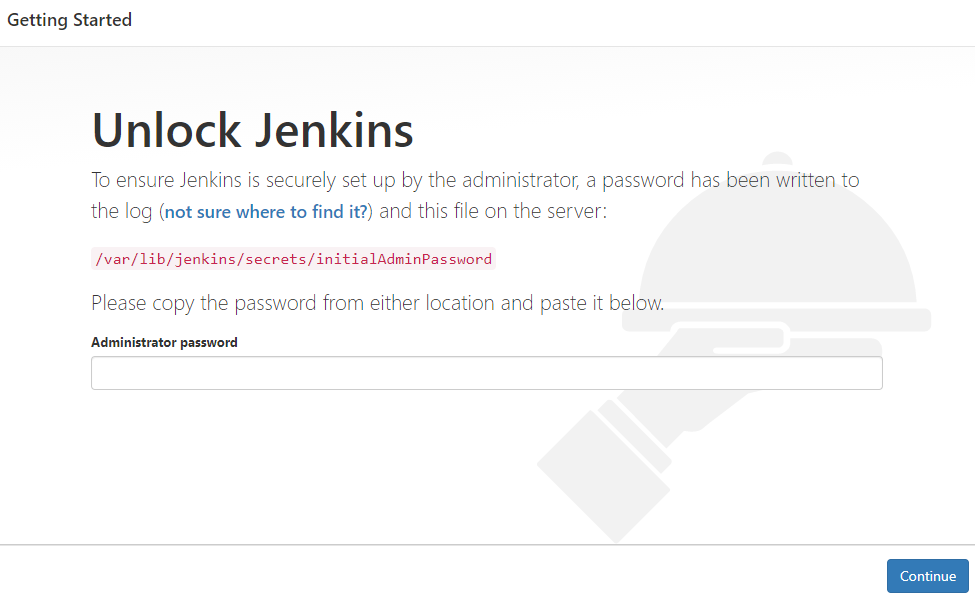

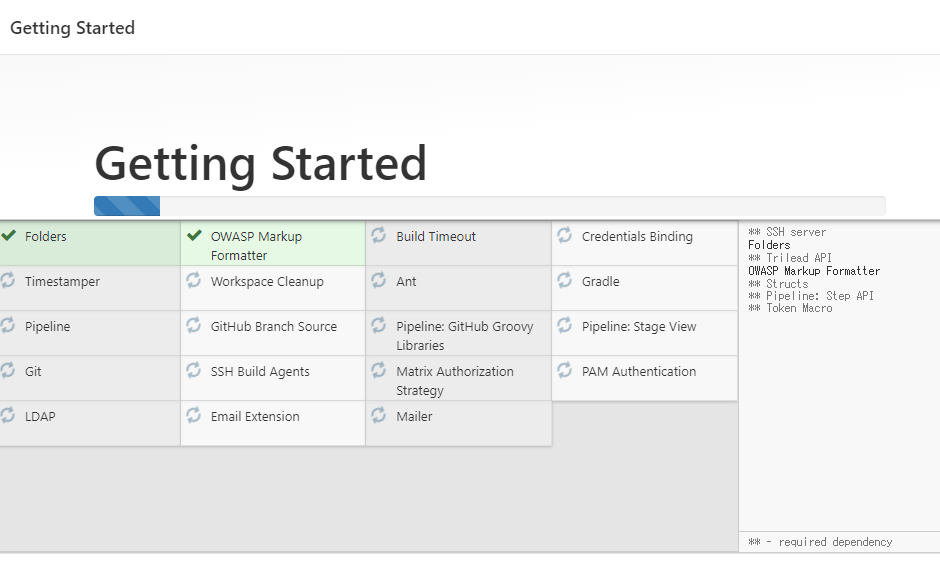
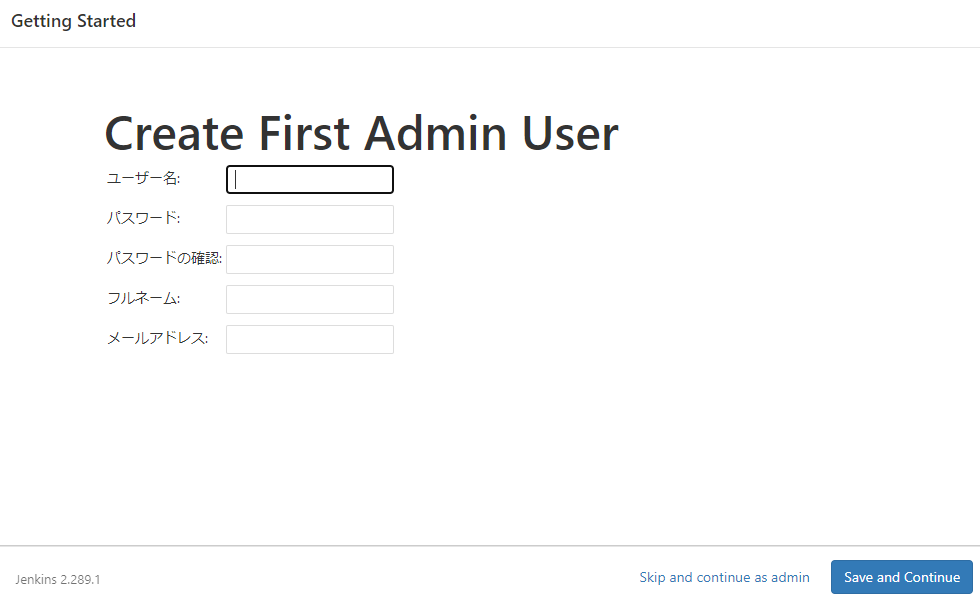
以上のステップで、jenkins のインストール完了。
MySQL 公式サンプルデータを使った課題
課題1.city table から、すべての Name と CountryCode を取得し、最初は CountryCode で次は Name で並び替える
city table のスキーマを確認する。
mysql> desc city;
+-------------+----------+------+-----+---------+----------------+
| Field       | Type     | Null | Key | Default | Extra          |
+-------------+----------+------+-----+---------+----------------+
| ID          | int(11)  | NO   | PRI | NULL    | auto_increment |
| Name        | char(35) | NO   |     |         |                |
| CountryCode | char(3)  | NO   | MUL |         |                |
| District    | char(20) | NO   |     |         |                |
| Population  | int(11)  | NO   |     | 0       |                |
+-------------+----------+------+-----+---------+----------------+
5 rows in set (0.00 sec)
回答
order by で CountryCode,Name を指定する。
mysql> select Name,CountryCode from city order by CountryCode,Name;
(結果セットは長いため省略)
課題2.countrylanguage table から、Language が English であり、Percentage が 10.0 を超えるすべての CountryCode,Language,IsOfficial,Percentage を取得する
countrylanguage table のスキーマを確認する。
mysql> desc countrylanguage;
+-------------+---------------+------+-----+---------+-------+
| Field       | Type          | Null | Key | Default | Extra |
+-------------+---------------+------+-----+---------+-------+
| CountryCode | char(3)       | NO   | PRI |         |       |
| Language    | char(30)      | NO   | PRI |         |       |
| IsOfficial  | enum('T','F') | NO   |     | F       |       |
| Percentage  | decimal(4,1)  | NO   |     | 0.0     |       |
+-------------+---------------+------+-----+---------+-------+
4 rows in set (0.00 sec)
回答
where で Language と Percentage を条件通りに指定する。
mysql> select * from countrylanguage where Language = 'English' and Percentage > 10.0;
+-------------+----------+------------+------------+
| CountryCode | Language | IsOfficial | Percentage |
+-------------+----------+------------+------------+
| AUS         | English  | T          |       81.2 |
| BLZ         | English  | T          |       50.8 |
| BMU         | English  | T          |      100.0 |
| CAN         | English  | T          |       60.4 |
| GBR         | English  | T          |       97.3 |
| GIB         | English  | T          |       88.9 |
| GUM         | English  | T          |       37.5 |
| IRL         | English  | T          |       98.4 |
| LCA         | English  | T          |       20.0 |
| NZL         | English  | T          |       87.0 |
| PRI         | English  | F          |       47.4 |
| TTO         | English  | F          |       93.5 |
| USA         | English  | T          |       86.2 |
| VIR         | English  | T          |       81.7 |
| VUT         | English  | T          |       28.3 |
+-------------+----------+------------+------------+
15 rows in set (0.00 sec)
課題3.2で得られた結果に、CountryName を country table から取得し加える
country table のスキーマを確認する。
countrylanguage table と、Code で JOIN ができそう。
mysql> desc country;
+----------------+---------------------------------------------------------------------------------------+------+-----+---------+-------+
| Field          | Type                                                                                  | Null | Key | Default | Extra |
+----------------+---------------------------------------------------------------------------------------+------+-----+---------+-------+
| Code           | char(3)                                                                               | NO   | PRI |         |       |
| Name           | char(52)                                                                              | NO   |     |         |       |
| Continent      | enum('Asia','Europe','North America','Africa','Oceania','Antarctica','South America') | NO   |     | Asia    |       |
| Region         | char(26)                                                                              | NO   |     |         |       |
| SurfaceArea    | decimal(10,2)                                                                         | NO   |     | 0.00    |       |
| IndepYear      | smallint(6)                                                                           | YES  |     | NULL    |       |
| Population     | int(11)                                                                               | NO   |     | 0       |       |
| LifeExpectancy | decimal(3,1)                                                                          | YES  |     | NULL    |       |
| GNP            | decimal(10,2)                                                                         | YES  |     | NULL    |       |
| GNPOld         | decimal(10,2)                                                                         | YES  |     | NULL    |       |
| LocalName      | char(45)                                                                              | NO   |     |         |       |
| GovernmentForm | char(45)                                                                              | NO   |     |         |       |
| HeadOfState    | char(60)                                                                              | YES  |     | NULL    |       |
| Capital        | int(11)                                                                               | YES  |     | NULL    |       |
| Code2          | char(2)                                                                               | NO   |     |         |       |
+----------------+---------------------------------------------------------------------------------------+------+-----+---------+-------+
15 rows in set (0.00 sec)
回答
country table と countrylanguage table を countryCode で JOIN した後、Language と Percentage で条件に沿ったフィルタを行う。
英語が世界標準後と言われているが、以下のような興味深い結果が得られた。
※このデータがどこまで正確であるかは不明
1.それぞれの国内における使用率?が10パーセントを超えている国は15か国しかない
2.Puerto RicoとTrinidad and Tobagoでは、英語が国内公式言語ではないにも関わらず、使用率が高い
mysql> select country.Name as CountryName, lang.CountryCode, lang.Language, lang.IsOfficial, lang.Percentage from country INNER JOIN countrylanguage lang ON country.Code = lang.CountryCode where lang.Language = 'English' AND lang.Percentage > 10.0;
+----------------------+-------------+----------+------------+------------+
| CountryName          | CountryCode | Language | IsOfficial | Percentage |
+----------------------+-------------+----------+------------+------------+
| Australia            | AUS         | English  | T          |       81.2 |
| Belize               | BLZ         | English  | T          |       50.8 |
| Bermuda              | BMU         | English  | T          |      100.0 |
| Canada               | CAN         | English  | T          |       60.4 |
| United Kingdom       | GBR         | English  | T          |       97.3 |
| Gibraltar            | GIB         | English  | T          |       88.9 |
| Guam                 | GUM         | English  | T          |       37.5 |
| Ireland              | IRL         | English  | T          |       98.4 |
| Saint Lucia          | LCA         | English  | T          |       20.0 |
| New Zealand          | NZL         | English  | T          |       87.0 |
| Puerto Rico          | PRI         | English  | F          |       47.4 |
| Trinidad and Tobago  | TTO         | English  | F          |       93.5 |
| United States        | USA         | English  | T          |       86.2 |
| Virgin Islands, U.S. | VIR         | English  | T          |       81.7 |
| Vanuatu              | VUT         | English  | T          |       28.3 |
+----------------------+-------------+----------+------------+------------+
15 rows in set (0.00 sec)
MySQL from 節いろいろ
サブクエリから生成されるテーブル
以下のような使い方は全く意味を成さない。直接NameとPopulationをcityテーブルから取得すればいい。
mysql> select t.Name, t.Population from (select ID, Name, CountryCode, District, Population from city) t limit 10;
+----------------+------------+
| Name           | Population |
+----------------+------------+
| Kabul          |    1780000 |
| Qandahar       |     237500 |
| Herat          |     186800 |
| Mazar-e-Sharif |     127800 |
| Amsterdam      |     731200 |
| Rotterdam      |     593321 |
| Haag           |     440900 |
| Utrecht        |     234323 |
| Eindhoven      |     201843 |
| Tilburg        |     193238 |
+----------------+------------+
10 rows in set (0.00 sec)
ビュー
ビューを作って
mysql> create view city_view as select Name, Population from city;
Query OK, 0 rows affected (0.01 sec)
ビューに対してクエリを発行し、データにアクセスする
mysql> select Name from city_view limit 10;
+----------------+
| Name           |
+----------------+
| Kabul          |
| Qandahar       |
| Herat          |
| Mazar-e-Sharif |
| Amsterdam      |
| Rotterdam      |
| Haag           |
| Utrecht        |
| Eindhoven      |
| Tilburg        |
+----------------+
10 rows in set (0.00 sec)
ビューが作成されたあと、追加のデータが作成されることはない。
ビューを作成する目的は、ユーザーから不要な列を隠したい、複雑なデータベースの状態を単純にしたいなど。
テーブルリンク
2つ以上のテーブルを何らかの共通のキーを元に結合して出力する。非常によく使われる。
mysql> select city.Name as CityName, country.Name as CountryName, country.Code from city INNER JOIN country ON city.CountryCode = country.Code limit
10;
+----------------+-------------+------+
| CityName       | CountryName | Code |
+----------------+-------------+------+
| Kabul          | Afghanistan | AFG  |
| Qandahar       | Afghanistan | AFG  |
| Herat          | Afghanistan | AFG  |
| Mazar-e-Sharif | Afghanistan | AFG  |
| Amsterdam      | Netherlands | NLD  |
| Rotterdam      | Netherlands | NLD  |
| Haag           | Netherlands | NLD  |
| Utrecht        | Netherlands | NLD  |
| Eindhoven      | Netherlands | NLD  |
| Tilburg        | Netherlands | NLD  |
+----------------+-------------+------+
10 rows in set (0.00 sec)
テーブルエイリアスを定義した場合
mysql> select c.Name as CityName, o.Name as CountryName, o.Code from city c INNER JOIN country o ON c.CountryCode = o.Code limit 10;
+----------------+-------------+------+
| CityName       | CountryName | Code |
+----------------+-------------+------+
| Kabul          | Afghanistan | AFG  |
| Qandahar       | Afghanistan | AFG  |
| Herat          | Afghanistan | AFG  |
| Mazar-e-Sharif | Afghanistan | AFG  |
| Amsterdam      | Netherlands | NLD  |
| Rotterdam      | Netherlands | NLD  |
| Haag           | Netherlands | NLD  |
| Utrecht        | Netherlands | NLD  |
| Eindhoven      | Netherlands | NLD  |
| Tilburg        | Netherlands | NLD  |
+----------------+-------------+------+
10 rows in set (0.00 sec)
MySQL select 文いろいろ
基本的な select
mysql> select * from city limit 10;
+----+----------------+-------------+---------------+------------+
| ID | Name           | CountryCode | District      | Population |
+----+----------------+-------------+---------------+------------+
|  1 | Kabul          | AFG         | Kabol         |    1780000 |
|  2 | Qandahar       | AFG         | Qandahar      |     237500 |
|  3 | Herat          | AFG         | Herat         |     186800 |
|  4 | Mazar-e-Sharif | AFG         | Balkh         |     127800 |
|  5 | Amsterdam      | NLD         | Noord-Holland |     731200 |
|  6 | Rotterdam      | NLD         | Zuid-Holland  |     593321 |
|  7 | Haag           | NLD         | Zuid-Holland  |     440900 |
|  8 | Utrecht        | NLD         | Utrecht       |     234323 |
|  9 | Eindhoven      | NLD         | Noord-Brabant |     201843 |
| 10 | Tilburg        | NLD         | Noord-Brabant |     193238 |
+----+----------------+-------------+---------------+------------+
10 rows in set (0.00 sec)
select (リテラル、ビルトイン関数)
mysql> select ID, 'Hello', Population * 2, LOWER(District) from city limit 10;
+----+-------+----------------+-----------------+
| ID | Hello | Population * 2 | LOWER(District) |
+----+-------+----------------+-----------------+
|  1 | Hello |        3560000 | kabol           |
|  2 | Hello |         475000 | qandahar        |
|  3 | Hello |         373600 | herat           |
|  4 | Hello |         255600 | balkh           |
|  5 | Hello |        1462400 | noord-holland   |
|  6 | Hello |        1186642 | zuid-holland    |
|  7 | Hello |         881800 | zuid-holland    |
|  8 | Hello |         468646 | utrecht         |
|  9 | Hello |         403686 | noord-brabant   |
| 10 | Hello |         386476 | noord-brabant   |
+----+-------+----------------+-----------------+
10 rows in set (0.00 sec)
テーブルからデータを取得しない select
mysql> select version(), user(), database();
+-----------+----------------+------------+
| version() | user()         | database() |
+-----------+----------------+------------+
| 5.7.34    | root@localhost | world      |
+-----------+----------------+------------+
1 row in set (0.00 sec)
列エイリアスをつける
mysql> select ID, 'Hello' greet, Population * 2 double_population, LOWER(District) district_lower from city limit 10;
+----+-------+-------------------+----------------+
| ID | greet | double_population | district_lower |
+----+-------+-------------------+----------------+
|  1 | Hello |           3560000 | kabol          |
|  2 | Hello |            475000 | qandahar       |
|  3 | Hello |            373600 | herat          |
|  4 | Hello |            255600 | balkh          |
|  5 | Hello |           1462400 | noord-holland  |
|  6 | Hello |           1186642 | zuid-holland   |
|  7 | Hello |            881800 | zuid-holland   |
|  8 | Hello |            468646 | utrecht        |
|  9 | Hello |            403686 | noord-brabant  |
| 10 | Hello |            386476 | noord-brabant  |
+----+-------+-------------------+----------------+
10 rows in set (0.00 sec)
重複の削除
いくつか重複しているcountryCodeに対して
mysql> select countryCode from city limit 10;
+-------------+
| countryCode |
+-------------+
| ABW         |
| AFG         |
| AFG         |
| AFG         |
| AFG         |
| AGO         |
| AGO         |
| AGO         |
| AGO         |
| AGO         |
+-------------+
10 rows in set (0.00 sec)
distinct で重複を削除
mysql> select distinct countryCode from city limit 10;
+-------------+
| countryCode |
+-------------+
| ABW         |
| AFG         |
| AGO         |
| AIA         |
| ALB         |
| AND         |
| ANT         |
| ARE         |
| ARG         |
| ARM         |
+-------------+
10 rows in set (0.00 sec)
